


This post is also available in:
 Português (Portuguese (Brazil))
During an Oracle Grid Infrastructure installation or when adding nodes to an Oracle RAC cluster, you may run into the following error:
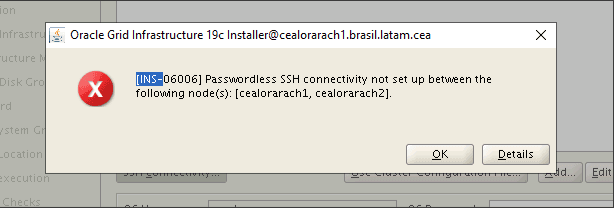
This error stops the installer dead in its tracks. It looks straightforward, but it can have multiple root causes — and it’s not always obvious which one is affecting your environment.
In this article, I’ll explain why this error occurs, walk through the most common causes, and provide a hands-on diagnostic checklist with commands you can run directly from the terminal to identify and fix the issue.
💡 In my case: The root cause was the
SSH_AUTH_SOCKvariable being set in the session, which interfered with the installer’s validation. If you suspect the same scenario, jump to Cause 5 — SSH_AUTH_SOCK. That said, I recommend going through the full checklist — the problem could be a combination of factors.
Why the INS-06006 Error Occurs
The Oracle Universal Installer (OUI) performs remote connectivity checks via SSH and SCP before proceeding with the Grid Infrastructure installation.
The installer needs to verify that:
- SSH connectivity between all nodes works without a password prompt
- The
sshandscpcommands are accessible in the user’s PATH - Hostname resolution is consistent across all nodes
- Permissions on
~/.sshare correct - No environment variables are interfering with authentication
If any of these checks fail, the OUI aborts with the INS-06006 error.
Common Causes and How to Diagnose Each One
Each cause below includes practical commands to verify and fix the issue.
1. Passwordless SSH Not Configured Correctly
This is the most frequent cause. Passwordless SSH must work bidirectionally between all nodes — including from each node to itself (loopback).
# Run from each node to all others (and to itself)
ssh -o BatchMode=yes -o StrictHostKeyChecking=no node1 hostname
ssh -o BatchMode=yes -o StrictHostKeyChecking=no node2 hostnameIf any of these commands prompt for a password or fail, SSH is not configured properly.
Fix:
# Generate SSH key (if it doesn't exist yet)
ssh-keygen -t rsa -b 4096 -N "" -f ~/.ssh/id_rsa

# Copy key to all nodes (including itself)
ssh-copy-id oracle@node1
ssh-copy-id oracle@node2Or use Oracle’s official setup script:
# Available in the Grid Infrastructure directory
cd $GRID_HOME/deinstall
./sshUserSetup.sh -user oracle -hosts "node1 node2" -noPromptPassphraseNote: The
sshUserSetup.shscript configures SSH across all nodes at once and is Oracle’s recommended method.
2. Incorrect Permissions on the ~/.ssh Directory
SSH is extremely strict about file permissions. If the ~/.ssh directory or its files have overly permissive settings, key-based authentication is silently ignored.
Diagnosis:
ls -la ~ | grep .ssh
ls -la ~/.ssh/Expected permissions:
| File/Directory | Permission |
|---|---|
~/.ssh/ | 700 |
~/.ssh/authorized_keys | 600 |
~/.ssh/id_rsa | 600 |
~/.ssh/id_rsa.pub | 644 |
User home directory (~) | 755 or less |
Fix:
chmod 700 ~/.ssh
chmod 600 ~/.ssh/authorized_keys
chmod 600 ~/.ssh/id_rsa
chmod 644 ~/.ssh/id_rsa.pub
chmod 755 ~Important: The user’s home directory (
~) must not have777permissions. This causes SSH to silently refuse key-based authentication.
3. Inconsistent Hostnames or Incorrect Name Resolution
The installer compares the hostnames you provided with what the nodes actually resolve to. Any mismatch causes failure.
Diagnosis:
# Check hostname on each node
hostname
hostname -f

# Check /etc/hosts — it should contain all nodes
cat /etc/hostsCommon issues:
- Hostname with uppercase letters (OUI can be case-sensitive in certain versions)
127.0.0.1mapped to the actual hostname (it should point to the network IP)- Duplicate or conflicting entries
Example of a correct /etc/hosts:
# Loopback
127.0.0.1   localhost localhost.localdomain

# Public
192.168.1.10   node1.example.com   node1
192.168.1.11   node2.example.com   node2

# Private (Interconnect)
10.0.0.10      node1-priv
10.0.0.11      node2-priv

# Virtual IPs
192.168.1.20   node1-vip
192.168.1.21   node2-vip

# SCAN
192.168.1.30 scan-clusterWarning: The node’s actual hostname must not be on the
127.0.0.1line. This is one of the sneakiest causes of failure.
4. SSH or SCP Not in PATH
The installer expects to find ssh and scp in the default PATH. In some hardened environments, these binaries may be in non-standard directories.
Diagnosis:
which ssh
which scp

# Verify they're accessible under the oracle user's environment
su - oracle -c "which ssh && which scp"Expected output:
/usr/bin/ssh
/usr/bin/scpIf they’re not in the PATH, add the following to the oracle user’s .bash_profile:
export PATH=/usr/bin:$PATH5. SSH_AUTH_SOCK Variable Interference
🔧 Real-world production experience — This was the root cause in my environment. SSH configuration, permissions, and hostnames were all correct. The issue was invisible until I inspected the session’s environment variables.
The SSH_AUTH_SOCK variable activates an SSH agent that can interfere with how the installer validates authentication.
Diagnosis:
echo $SSH_AUTH_SOCKIf it returns a value (e.g., /tmp/ssh-XXXX/agent.1234), the SSH agent is active.
Fix:
unset SSH_AUTH_SOCKMake sure to apply this on all nodes in the session that will run the installer.
Note: This is not the most common cause, but it can occur in environments where
ssh-agentstarts automatically with the session (e.g., via.bashrc,.profile, or a desktop manager).
6. Firewall or Network Rules Blocking SSH
In corporate environments with stricter network security, port 22 may be blocked between cluster nodes.
Diagnosis:
# Test connectivity on port 22
nc -zv node2 22

# Or with a timeout
ssh -o ConnectTimeout=5 -o BatchMode=yes node2 hostnameFix:
Open port 22 (SSH) between all cluster nodes on both the local firewall and the network:
# Check local firewall (firewalld)
sudo firewall-cmd --list-ports
sudo firewall-cmd --permanent --add-port=22/tcp
sudo firewall-cmd --reload

# Or with iptables
sudo iptables -L -n | grep 22Quick Diagnostic Checklist
Use this checklist as a reference before running the installer:
# 1. Test bidirectional SSH (from each node to all others)
ssh -o BatchMode=yes node1 hostname
ssh -o BatchMode=yes node2 hostname

# 2. Check permissions
ls -la ~/.ssh/

# 3. Check /etc/hosts
cat /etc/hosts

# 4. Check PATH
which ssh && which scp

# 5. Check environment variables
echo $SSH_AUTH_SOCK

# 6. Test port 22
nc -zv node2 22If all tests pass and the error persists, try running Oracle’s sshUserSetup.sh as a last resort:
cd $GRID_HOME/deinstall
./sshUserSetup.sh -user oracle -hosts "node1 node2" -noPromptPassphraseConclusion
The INS-06006 error is a common roadblock during Oracle RAC installation, but it almost always has a straightforward fix. The key is to avoid guessing — instead, work through a systematic diagnosis:
- SSH connectivity — does it work passwordless in all directions?
- Permissions — are
~/.sshand its files set correctly? - Name resolution — do hostnames match across all nodes?
- PATH — are
sshandscpfound? - Environment variables — is
SSH_AUTH_SOCKclear? - Network — is port 22 open between nodes?
Once you fix the root cause, re-run the installer — it should proceed normally.
References: